Hi, I’m Justin Wallis
AI Systems Builder.
Foundborne Builder.
SteadLamp Architect.
I’m developing Foundborne, a planned AI systems and infrastructure venture, and SteadLamp, a separate Home-first household app in development. My work spans AI, automation, infrastructure, and software grounded in real workflows.

AI Systems, Infrastructure & Automation
AI-Ready Web Systems
WordPress, CMS, hosting, performance, security, and content systems shaped to support credible AI products and public proof-of-work.
Apps, APIs & Automations
Connected tools, app logic, APIs, plugins, forms, payments, and workflow automations that turn ideas into usable systems.
Secure System Foundations
Networks, IP planning, firewalls, pfSense, connectivity, access patterns, and reliability work behind practical AI infrastructure.
Workers, Servers & Storage
Windows, Linux, virtualization, NAS, TrueNAS, local machines, recovery practices, and worker-node foundations for AI-assisted builds.
Hosting & Deployment
Domains, DNS, hosting, deployments, migrations, public sites, and infrastructure choices that make projects easier to ship and maintain.
Troubleshooting & QA
Hands-on debugging, verification, documentation, and practical follow-through across systems, software, websites, networks, and devices.
Now Building: Foundborne & SteadLamp
Foundborne is the planned AI systems and infrastructure venture. Its portfolio also includes a planned internal Founders Organization initiative to support technology and AI entrepreneurs; it is not a separate company or launched program. SteadLamp is a separate Home-first household app in development. Wallis Builds documents projects and experiments across AI, automation, and infrastructure. Each project is presented at its actual stage; plans and prototypes are not presented as launched products.
Foundborne — AI Systems Venture (planned)
Planned focus: private and local AI, agent orchestration, and customer-owned systems. Current work is in research and development; client services are not presented as available.
SteadLamp Home-First App (in development)
A separate Home-first household app in development, designed to organize property projects, household routines, schedules, records, and reminders. Broader Life and Business directions remain longer-term.
Wallis Builds — Project Portfolio
A portfolio of experiments and project work across AI, infrastructure, automation, websites, and software. Each item is shown according to its documented stage.
Local AI & Worker Infrastructure
Hands-on infrastructure for local machines, worker nodes, repositories, recovery, backups, and lightweight AI experiments that can move from idea to execution.
Technical Foundation & Experience
Education & Training
Professional & Technical Development
Continued hands-on learning across networking, servers, virtualization, firewalls, storage systems, WordPress, hosting, Linux environments, and third-party platform configuration.
York College of Pennsylvania
Graphic DesignFormal education in visual communication, design, and digital production that complements technical work in web systems, user-facing technology, and digital platforms.
Harford Technical High School
Printing & Computer GraphicsTechnical education focused on computer graphics, printing, production technologies, and hands-on digital workflows.
Technical Experience
Systems & Infrastructure
Networking • Servers • SecurityHands-on experience with IP configuration, networking, pfSense firewalls, security systems, hypervisors, NAS environments including TrueNAS, and Windows and Linux server platforms.
WordPress & Web Administration
WordPress • Hosting • Third-Party SystemsAdvanced WordPress experience spanning setup, development, administration, themes, plugins, hosting, server configuration, integrations, troubleshooting, performance optimization, and security.
Server & Platform Configuration
Windows • Linux • VirtualizationExperience configuring and working with Microsoft server environments, Ubuntu, CentOS, Red Hat, virtualization platforms, storage systems, and third-party servers and applications.
AI Lab & Infrastructure
Servers, hypervisors, pfSense, networking, NAS/TrueNAS, Linux/Windows environments, and practical foundations for AI-assisted systems.
Public Web & Proof Systems
WordPress, hosting, migrations, performance, security, integrations, and public-facing systems that make AI work visible and credible.
Server & Platform Configuration
Linux and Windows environments, third-party servers, hosted services, application configuration, and practical operational support.
AI Product Experiments
Product testing, app workflows, e-commerce systems, prototype evaluation, and implementation work connected to real user needs.
Selected Projects

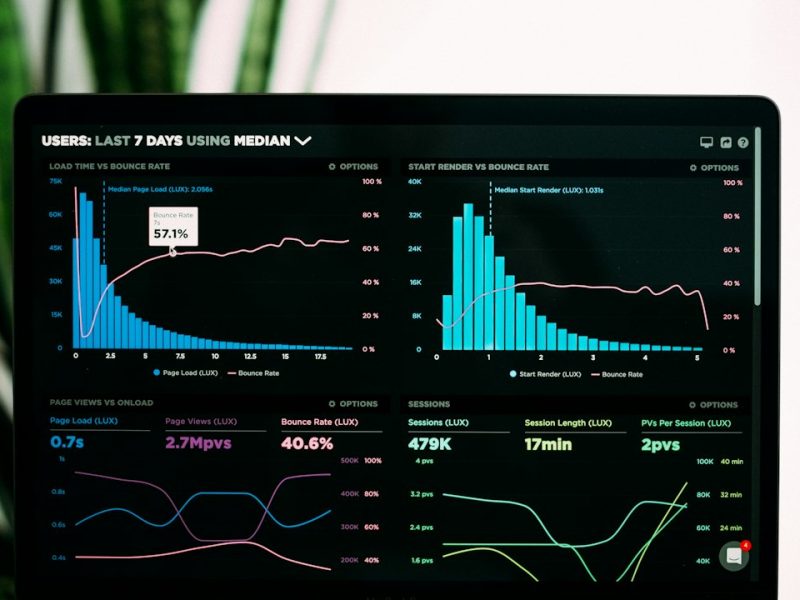
Foundborne AI Systems — Internal R&D Concept
An internal R&D concept exploring AI-assisted administration, structured knowledge, and repeatable workflows. The interface visuals are illustrative; this is not a launched product or customer deployment.
This project demonstrates a practical AI-assisted administration and knowledge system built around real files, documents, trackers, recurring responsibilities, research, and day-to-day workflows. The goal is to move beyond using AI only as a chat interface and instead organize information so an assistant can work with useful context, repeatable processes, and structured systems.
Assistant & Administrative Workflows
AI-assisted workflows support research, planning, document creation, reminders, recurring tasks, project follow-up, and administrative work while keeping the user in control of the underlying information and decisions.
Structured Knowledge Systems
Google Drive, documents, spreadsheets, trackers, and reference material are organized into a clearer knowledge structure so relevant information can be located, interpreted, updated, and reused more efficiently.
Automation & Monitoring
Repeatable workflows can include scheduled tasks, reminders, monitoring, status checks, reports, and multi-step research or document processes designed to reduce repetitive manual work.
Review → classify → update tracker
Collect → summarize → flag decisions
Monitor → remind → record status
Applied AI Rather Than a Standalone Chatbot
The system is designed around how the person actually works: what information they maintain, what tasks repeat, what needs review, and where time is being lost. AI becomes one component in a larger operating structure rather than a separate tool that has to be prompted from scratch every time.
Privacy-Aware Demonstration
Portfolio visuals use sanitized, illustrative structures rather than exposing private documents, account information, or personal records. The emphasis is on system design, workflow architecture, and practical implementation.


LLM & RAG Crypto Prototype — Discontinued
A discontinued experiment combining language models, retrieval-augmented generation, and cryptocurrency data. This is separate from the current SteadLamp Home-first app; visuals are illustrative and do not show live prices or trading performance.
This prototype explored how large language models and retrieval-augmented generation could be combined with cryptocurrency information and an automated trading component. The concept was intended to make market information easier to query through an AI-driven interface while also exploring how LLM-based systems could interact with external data and application logic.
LLM & RAG Architecture
The project incorporated LLM and retrieval concepts so the system could work with external information instead of relying only on a model’s built-in knowledge. This provided hands-on exposure to retrieval pipelines, context handling, model integration, and the surrounding application architecture.
Application Shell & Integration
My work focused primarily on portions of the application shell, configuration, integration, and understanding how the system components fit together. I was not the primary developer of the core trading logic or the underlying model technology.
Lightweight Model Testing
I also configured and tested smaller language models, gaining practical experience with deployment considerations, resource requirements, model behavior, and the tradeoffs involved in running AI systems outside of a fully managed platform.
Market + reference context
LLM-assisted interpretation
Prototype application logic
Prototype Evaluation
The project was ultimately discontinued after evaluating the development effort, operating cost, maintenance requirements, and whether continued investment made sense relative to rapidly advancing commercial AI platforms. The experience was still valuable as a technical prototype and provided direct exposure to the practical complexity behind maintaining an AI-enabled application.
What the Project Demonstrates
The project represents hands-on learning across LLM integration, RAG concepts, smaller model deployment, application architecture, AI-enabled interfaces, and the practical decision-making involved in determining whether a prototype is worth continuing into production.

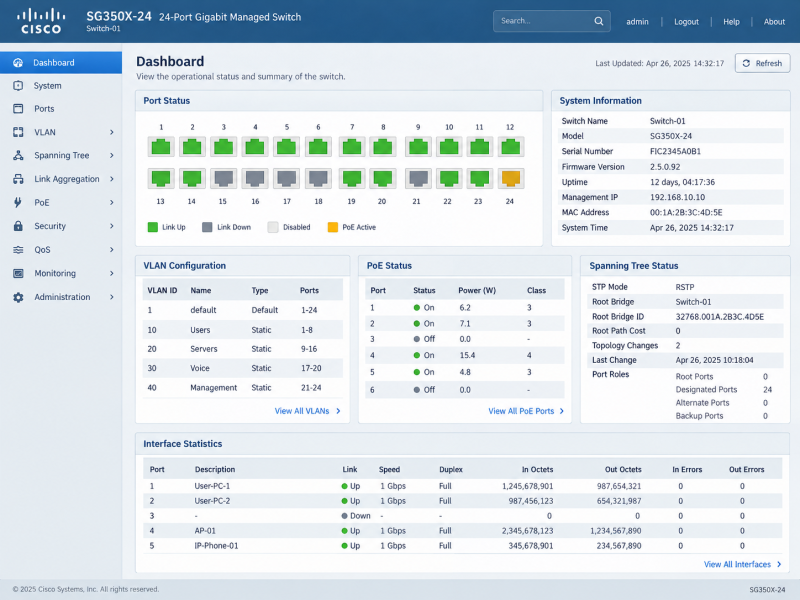
Managed Network Infrastructure
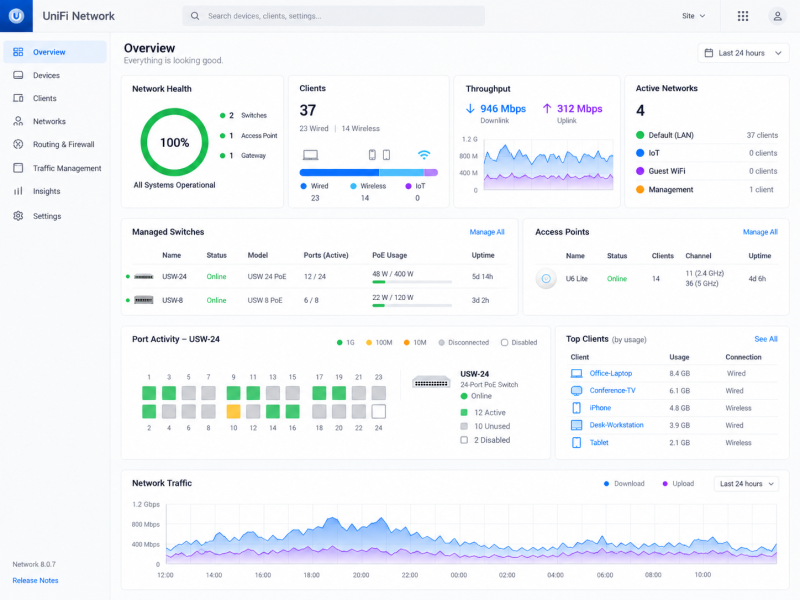
Multi-vendor network administration spanning managed switching, wireless infrastructure, VLAN segmentation, PoE, client connectivity, and network visibility.
- Environment Lab / Demonstration Environment
- Scope Switching, Wireless & VLANs
- Platforms UniFi · Aruba · Cisco
- Focus Configuration · Monitoring · Troubleshooting
Modern network environments often combine equipment from multiple vendors, each with different management tools and workflows. This project highlights experience working across managed network platforms to organize switching, wireless access, VLANs, connected devices, PoE resources, and overall network health from centralized administration interfaces.
Network Architecture
Network infrastructure is organized around clear device roles, logical segmentation, and reliable connectivity between users, servers, wireless systems, and network services. Centralized management provides visibility into device health, connected clients, traffic, and infrastructure status.
Switching & Segmentation
Managed switching supports VLAN configuration, port administration, PoE devices, uplinks, and separation of traffic across user, voice, server, wireless, and management networks. These controls help maintain an organized and manageable network environment.
Monitoring & Troubleshooting
Network dashboards provide real-time insight into switches, access points, connected clients, interface utilization, alerts, and performance trends. This visibility helps identify connectivity issues, overloaded interfaces, offline devices, and other conditions requiring attention.
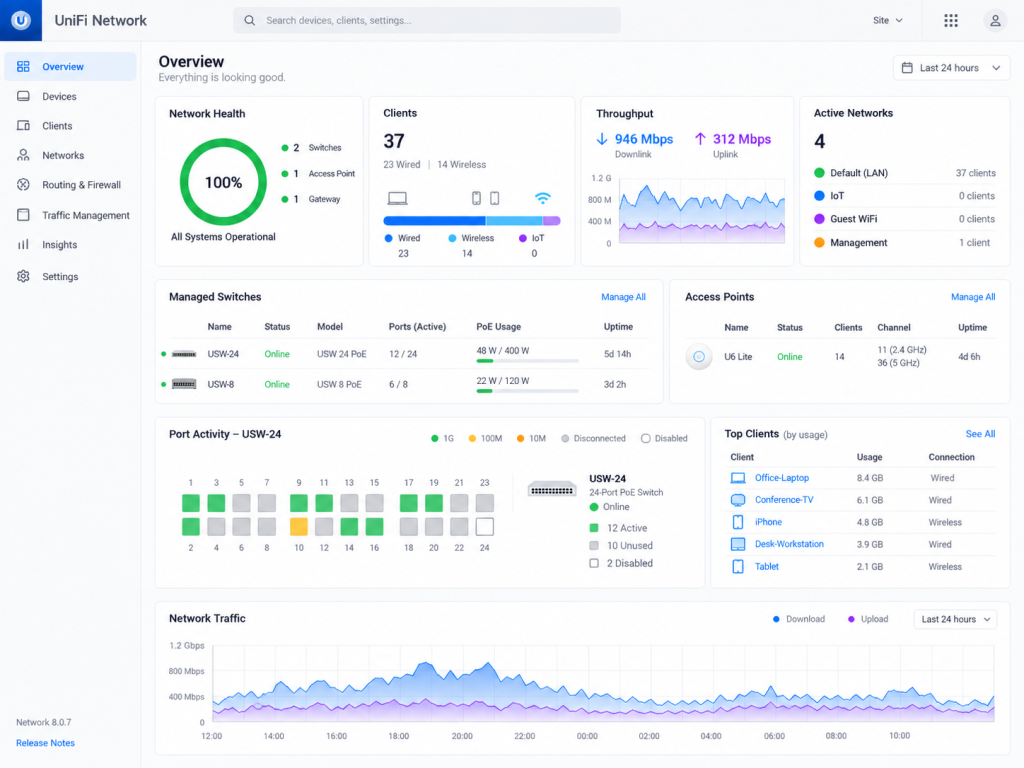
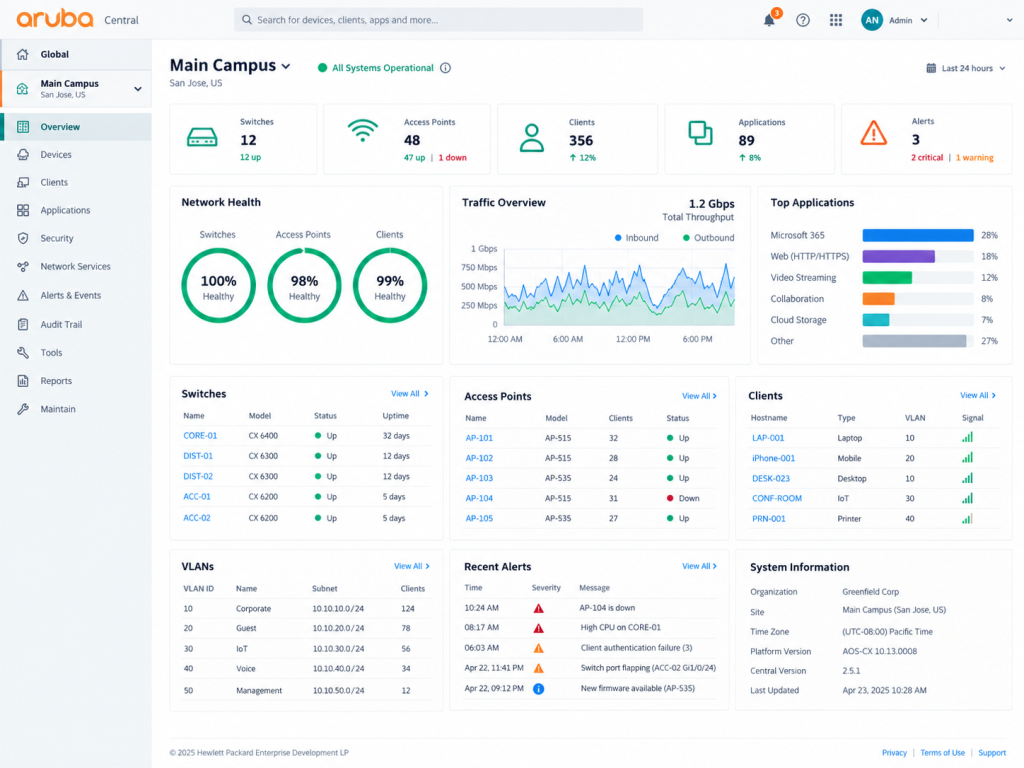
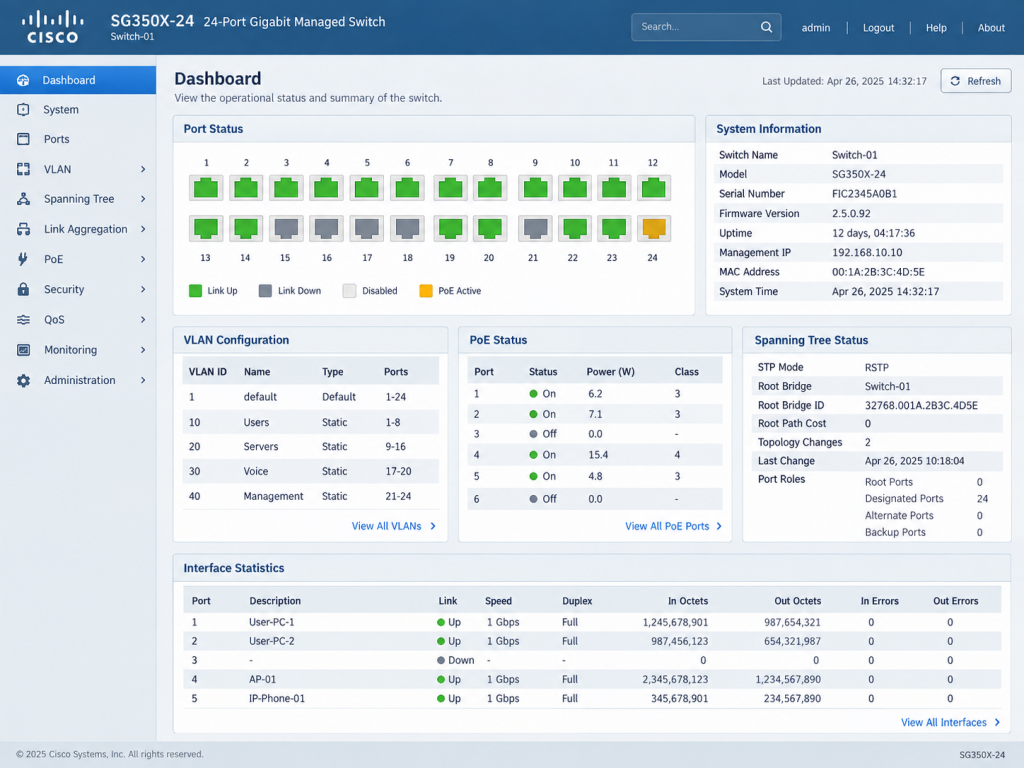
Working across different network platforms requires understanding the underlying networking concepts rather than relying on a single vendor interface. Familiarity with multiple management environments makes it easier to adapt to existing infrastructure, troubleshoot mixed-vendor networks, and support technology as organizational needs change.
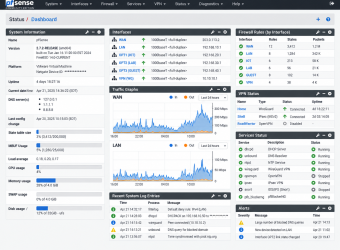
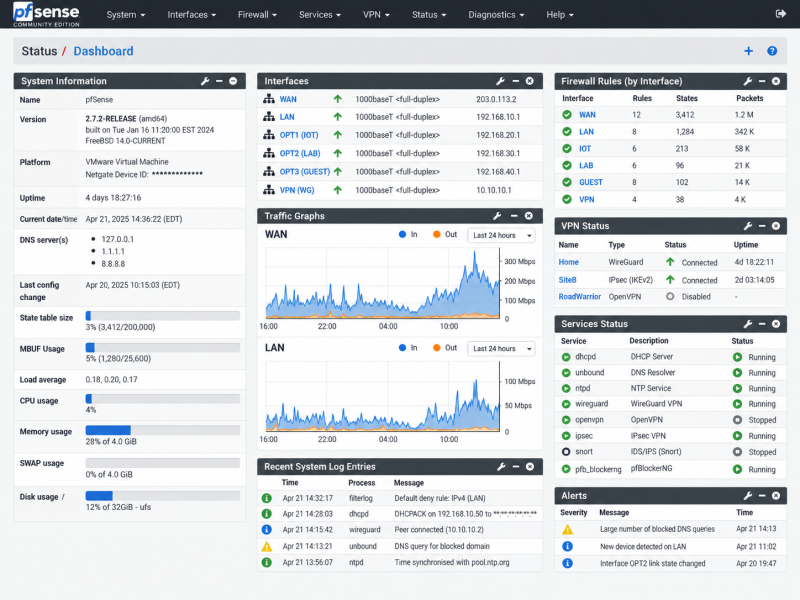
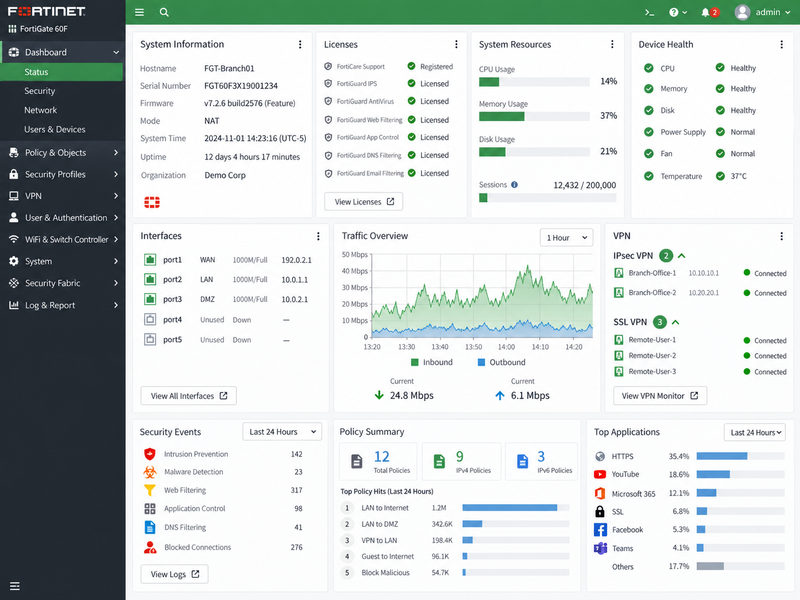
Firewall & Network Security
Firewall administration and network security across multiple platforms, including traffic policies, segmentation, VPN connectivity, monitoring, and security visibility.
- Environment Lab / Demonstration Environment
- Scope VPN & Traffic Control
- Platform pfSense · FortiGate
- Focus Policies · Segmentation · Monitoring
Firewall management is a core part of maintaining a secure and reliable network environment. This project highlights administration across pfSense and FortiGate platforms, including interface management, traffic policies, VPN connectivity, network segmentation, system health, and security monitoring.
Firewall Policy & Segmentation
Firewall rules and network interfaces are organized to control traffic between internal networks, internet-facing services, VPN users, and isolated segments. Clear policy structure helps reduce unnecessary access while maintaining reliable connectivity.
VPN & Secure Access
VPN services provide protected connectivity for remote users and site-to-site communication. Monitoring tunnel status, authentication, routing, and access policies helps maintain dependable and secure remote access.
Security Monitoring
Firewall dashboards provide visibility into traffic, blocked connections, system resources, security events, application activity, and network health. This information supports troubleshooting and helps identify unusual or potentially unwanted activity.
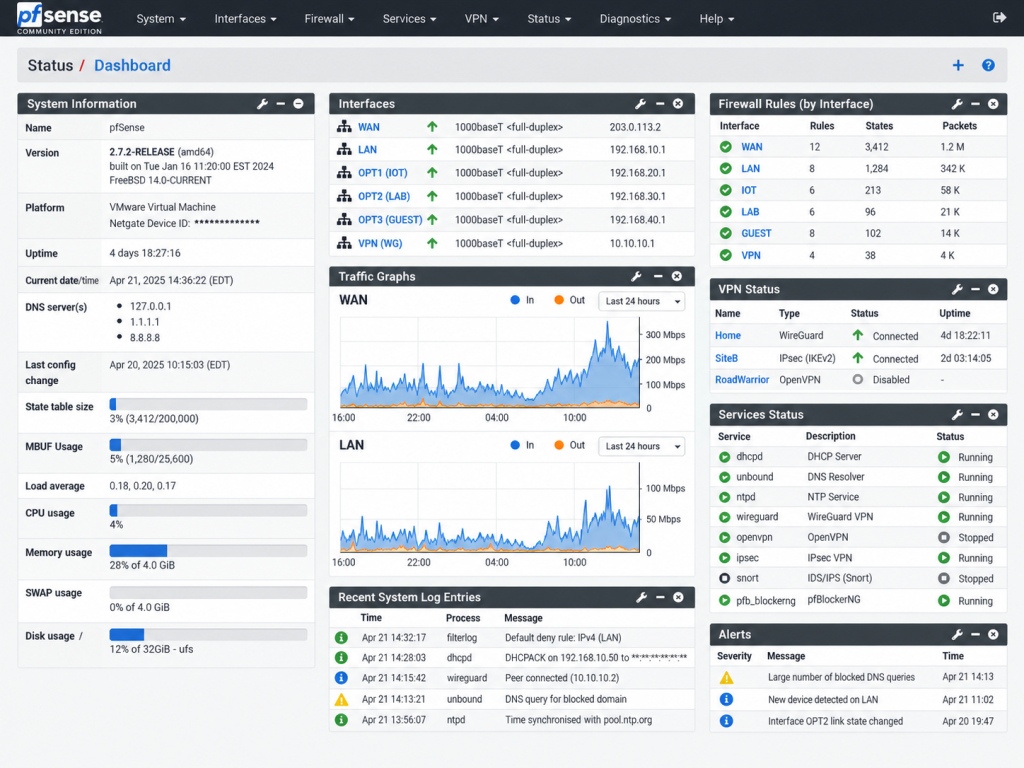
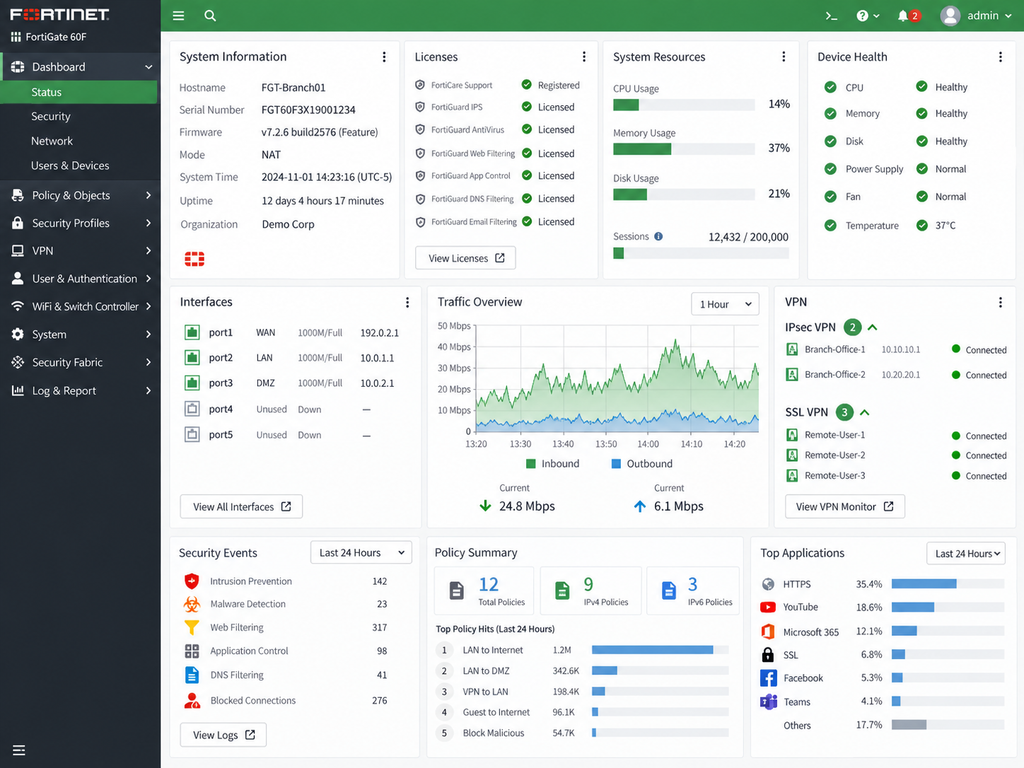
Working with different firewall platforms reinforces the underlying concepts of policy-based access control, segmentation, routing, VPN connectivity, and network monitoring. Familiarity with multiple interfaces also makes it easier to adapt to existing security infrastructure and troubleshoot mixed-vendor environments.
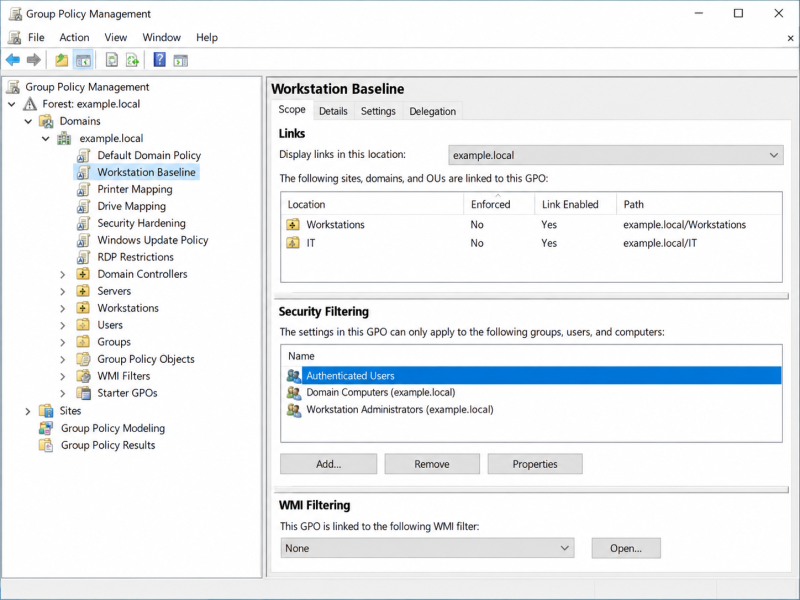
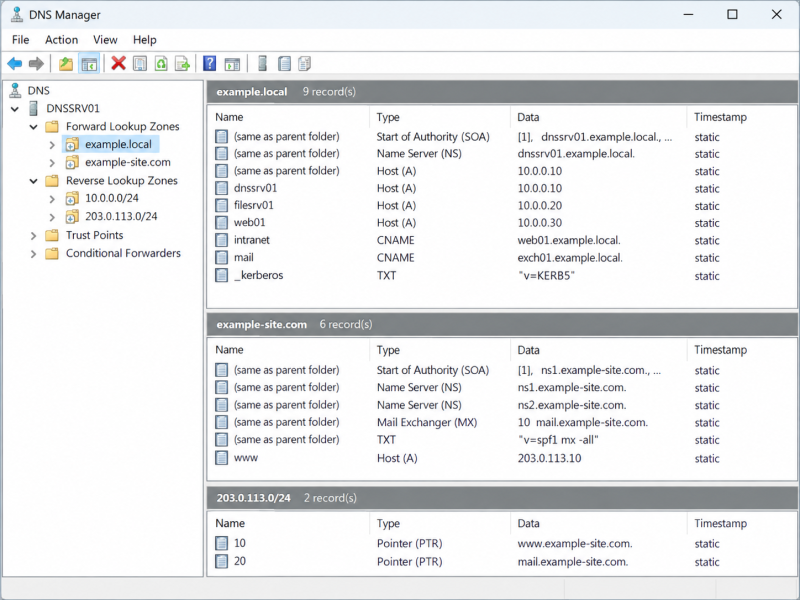
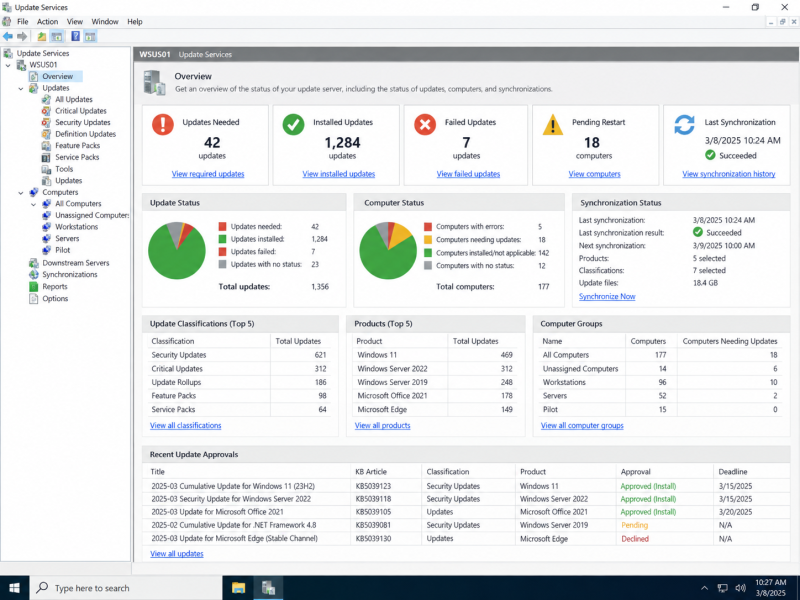
Windows Infrastructure Administration
Windows Server administration across identity, directory services, policy management, DNS, and centralized update operations.
- Environment Lab / Demonstration Environment
- Scope Identity, Policy, DNS & Updates
- Platforms Windows Server · Active Directory · DNS · Group Policy · WSUS
- Focus Administration · Access · Configuration
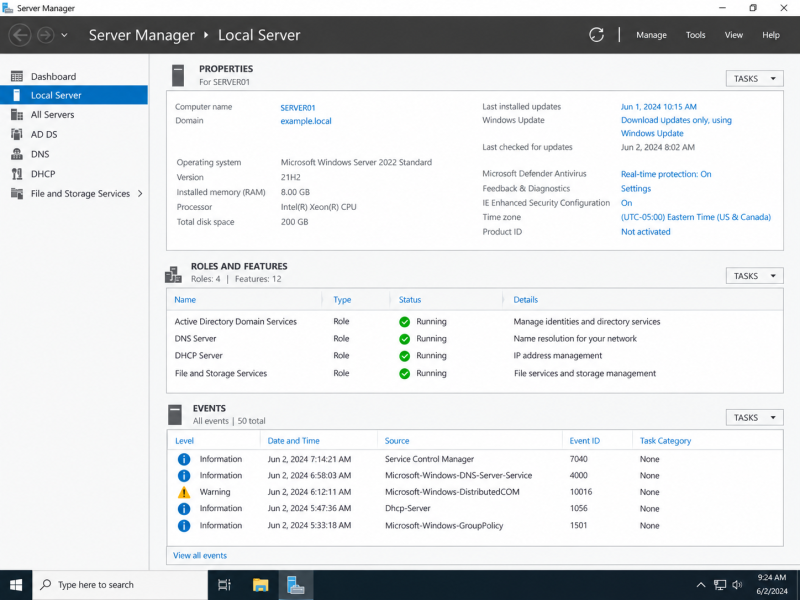
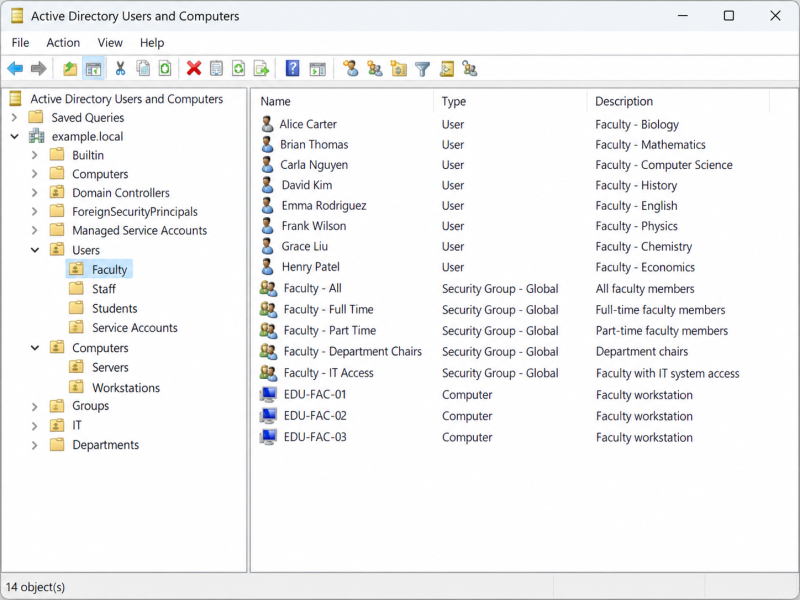
Windows infrastructure often brings multiple administrative services together into one environment. This project demonstrates server management, directory-based user and computer administration, name resolution, centralized policy configuration, and update management across core Windows Server tools.
Identity & Access Management
Active Directory provides centralized administration of users, computers, organizational units, and security groups. A structured directory environment supports account management, permissions, device organization, and consistent access across network resources.
Policy & Configuration Management
Group Policy allows common workstation, security, access, and system settings to be applied from a central management point. Organized policies help standardize configurations across users and computers while reducing repetitive manual administration.
Core Services & Updates
DNS supports internal name resolution and service discovery, while Windows Server Update Services provides centralized visibility and control over operating-system and Microsoft software updates. Together, these services support reliable day-to-day administration of Windows environments.
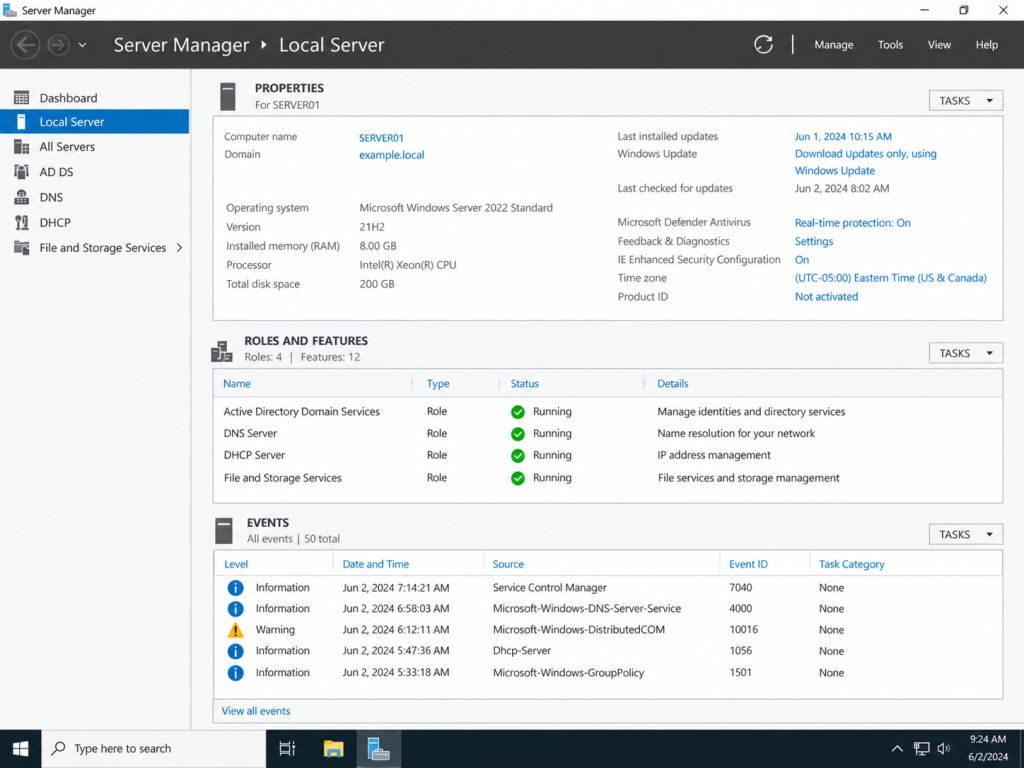
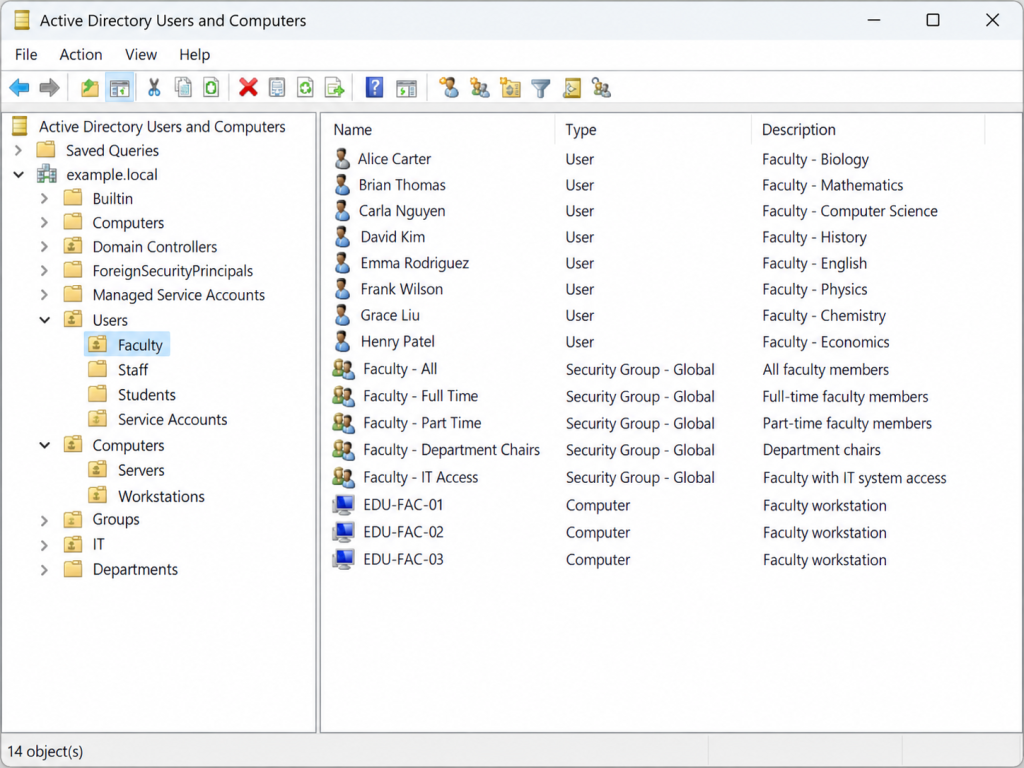
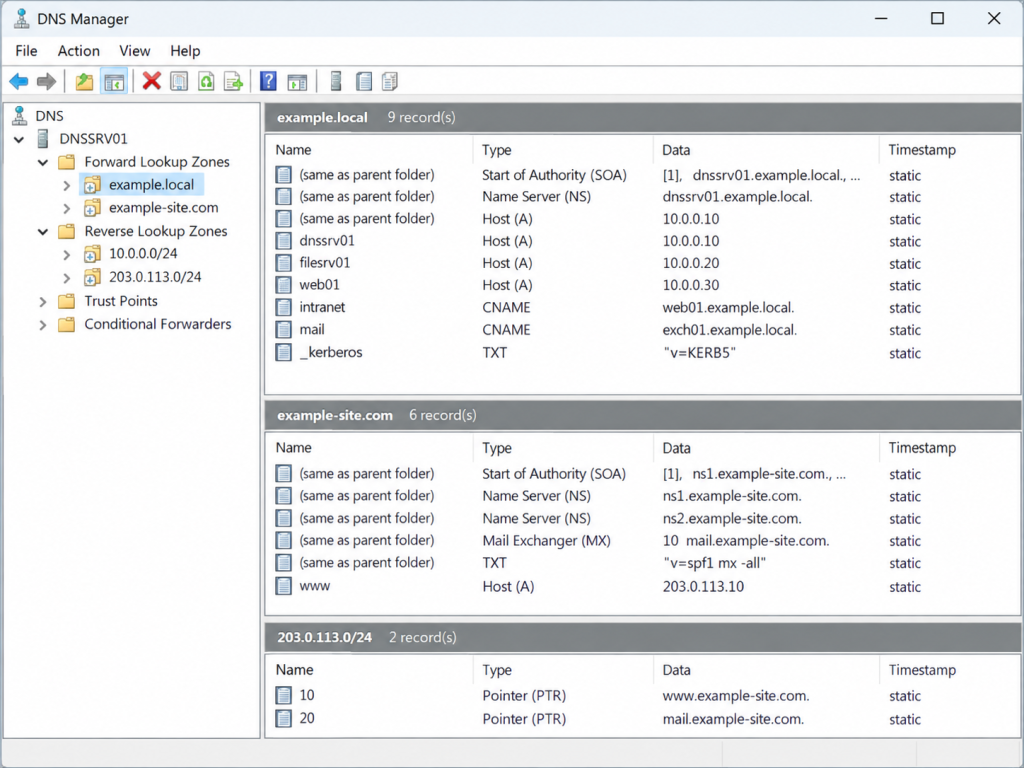
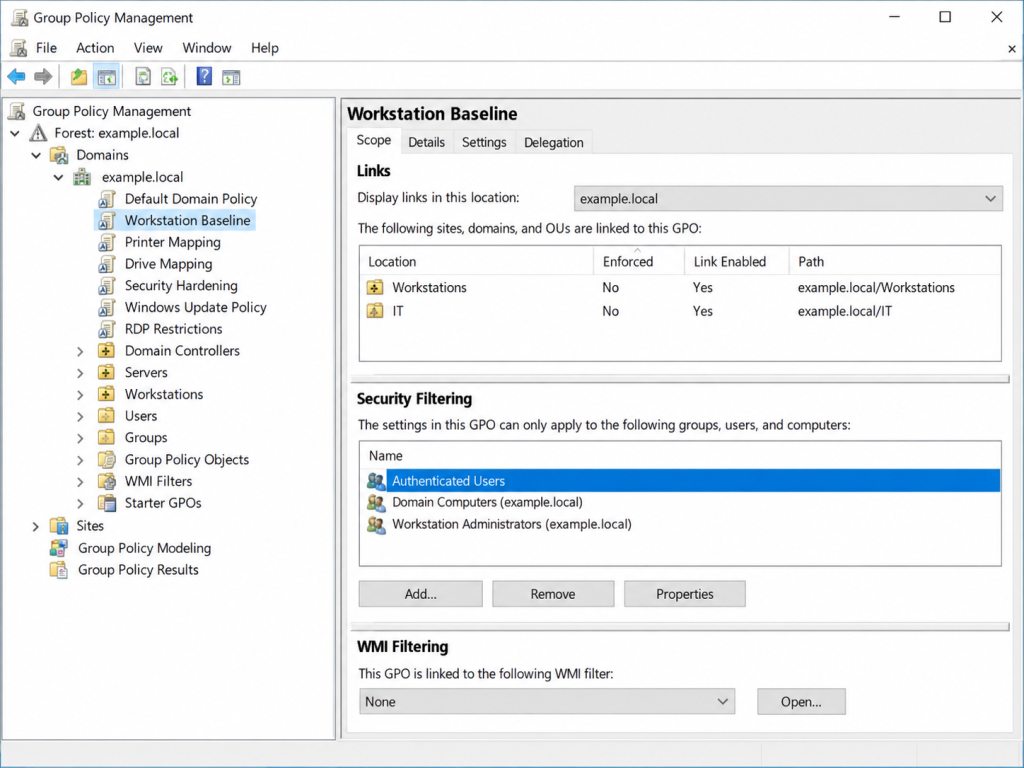
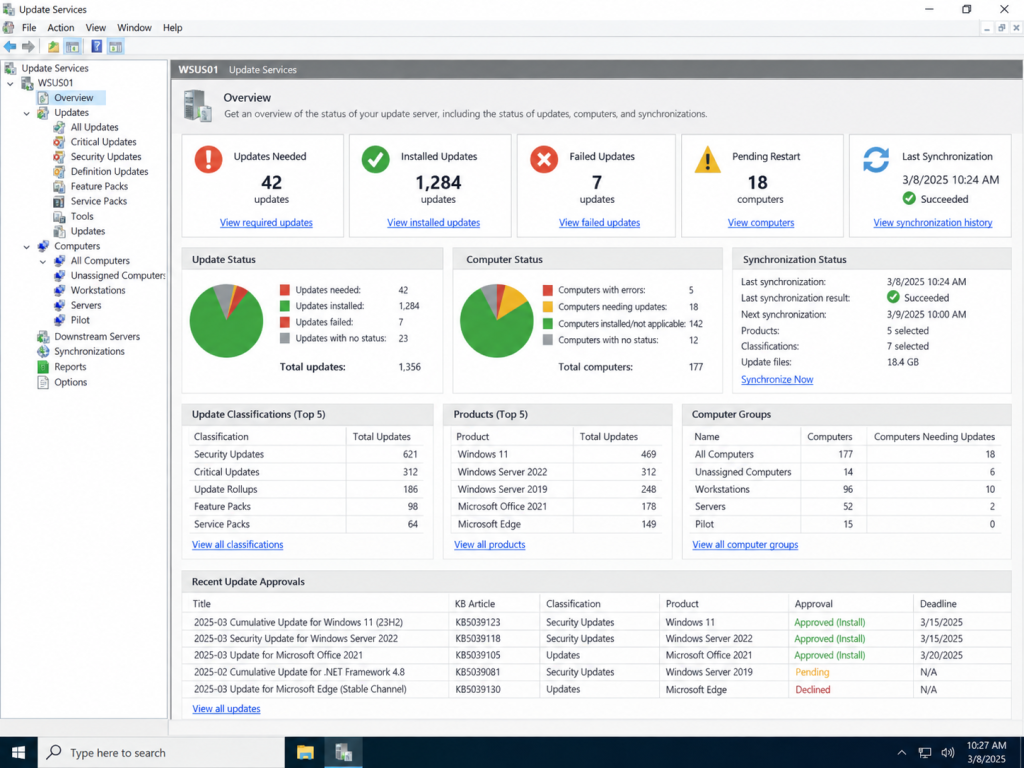
Effective Windows infrastructure administration depends on understanding how identity, policy, name resolution, server roles, and system maintenance work together. Managing these services from centralized tools provides greater consistency, visibility, and control across users, computers, and network resources.
Educational Platform & LMS Development
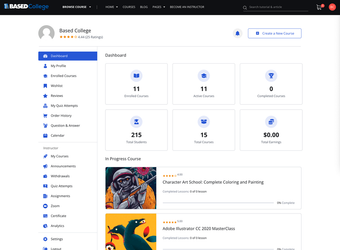
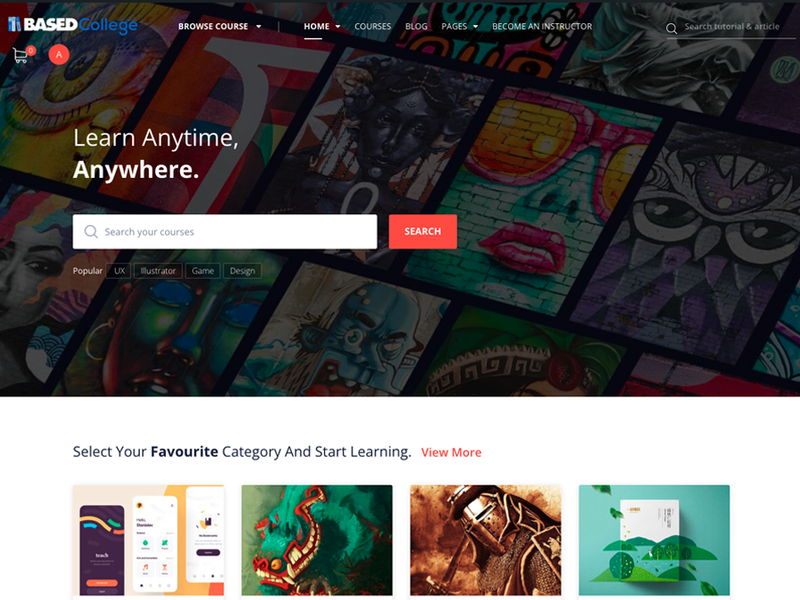
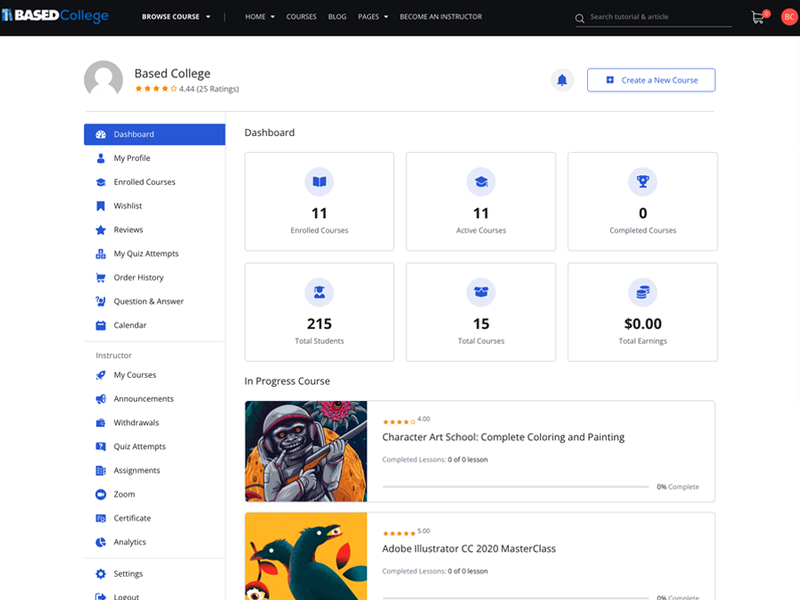
Development and customization of an online learning platform supporting course discovery, student activity, instructor tools, and educational content management.
- Environment Web Application / Demonstration Platform
- Scope Learning Management & Course Delivery
- Platforms WordPress · LMS · Web Application
- Focus Course Management · User Experience · Administration
This project demonstrates the design and implementation of a web-based learning environment built around course access, student engagement, instructor administration, and educational content delivery. The platform combines a public-facing course experience with authenticated dashboards for managing courses, progress, assignments, and related learning activities.
Learning Experience
The public-facing interface is structured to help users discover courses, browse categories, search educational content, and move easily between learning resources.
Student & Instructor Tools
Authenticated dashboards support activities such as enrolled courses, quizzes, assignments, announcements, progress tracking, course management, and instructor administration.
Platform Administration
The system brings together content management, user accounts, course organization, analytics, certificates, and other learning-related functions within a centralized web environment.
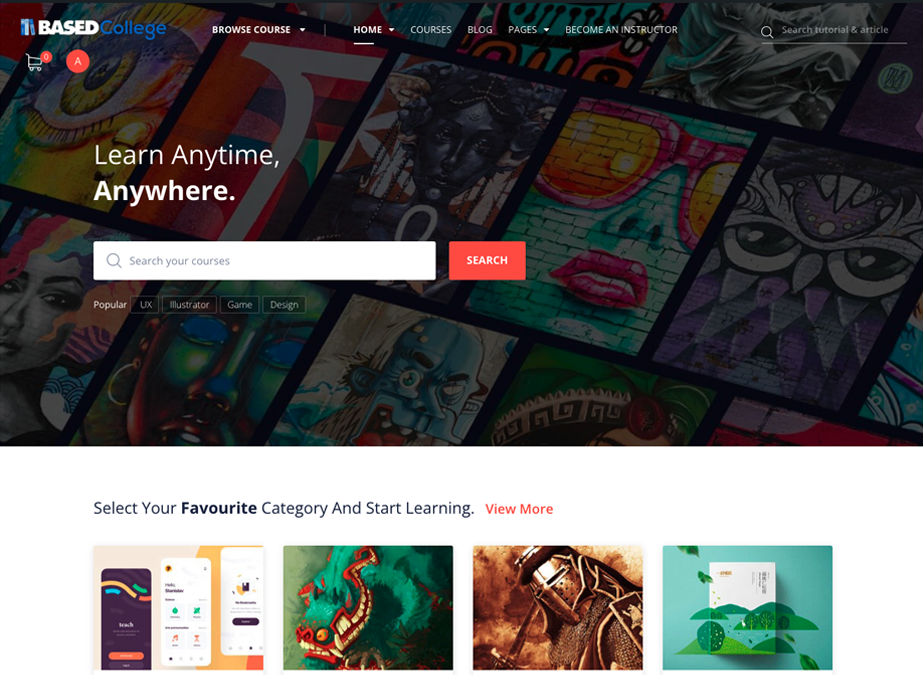
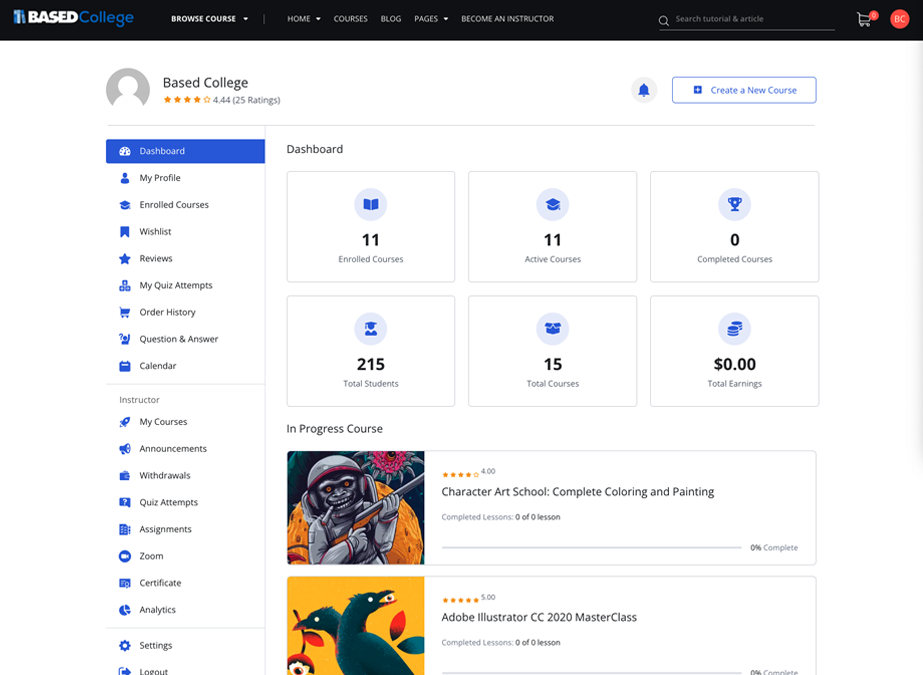
A learning platform requires more than visual design; it must also organize users, course content, administrative tools, and ongoing educational activity in a way that remains easy to manage. This project demonstrates experience working with both the public-facing and administrative sides of an LMS-based web environment.
Selected Experience & Focus
AI Systems Support
AI Workflows, Automation & Technical Follow-ThroughPlanned internal R&D exploring AI workflows, automation, documentation, and software systems. Foundborne is in development; services are not currently offered.
AI workflow mapping
Automation planning
AI-assisted documentation
Tool and app integration
Execution tracking
Practical system guidance
Systems & Infrastructure
Networks, Servers & InfrastructureSelected hands-on experience across networks, servers, and infrastructure, reflected in past projects. This section describes experience, not a current consulting offer.
Network & IP configuration
pfSense & firewall configuration
Windows & Linux servers
Ubuntu, CentOS & Red Hat
Hypervisors & virtualization
NAS & TrueNAS
Third-party server configuration
Security & infrastructure review
Web & WordPress
WordPress, Hosting & Web SystemsSelected experience across WordPress, hosting, integrations, and troubleshooting, reflected in past projects. This section describes experience, not a current service offer.
WordPress development & administration
Hosting & server configuration
Domains & DNS
Themes, plugins & integrations
Performance optimization
Security hardening
Migration & troubleshooting
Third-party service integrations
Start a Conversation
Share a note about Foundborne, SteadLamp, AI systems, automation, infrastructure, WordPress, or the kind of technical build you want to explore. The best starting point is a real workflow, a stuck system, or an idea that needs practical execution.
Email: JW@JustinWallis.com